Faceted Composite Tracks
Overview
The UCSC Genome Browser carries a lot of data tracks, especially on its core assemblies. To keep them navigable, we offer several types of container tracks - tracks whose job is to hold other tracks, the way a folder holds files. A composite track is one of those containers: it groups related tracks and gives them a single configuration page. Our Conservation tracks are usually composites, and so is each of our "All GENCODE" tracks, such as All GENCODE V50 on hg38. The standard composite interface works well for somewhere around 20-200 subtracks, but it gets unwieldy once the count runs into the thousands. Faceted composites are an alternate interface for those cases.
The faceted display works best for data sets where each subtrack carries many values you might want to filter on (cell type, protocol, date, experiment scores), and where any one user only cares about a handful of them. Since the point is to help users find the subtracks relevant to them, the only per-subtrack option here is whether it displays or not. Anything else about an individual subtrack gets set later, through the right-click Configure menu in the main hgTracks display.
Quick Start
The short version: a faceted composite works like any other composite, except that
it can't include views or subgroups. All subtracks live under the same parent, the
composite track itself, and they can be a mix of data types. A metadata file is
required, has to be web-accessible, and holds the facet values for each track. The
composite's trackDb settings need a "primaryKey" setting naming one of the fields in
that file, and child tracks need names matching <parent_name>_<primaryKey value>.
TrackDb entries
  track myComposite
  compositeTrack faceted
  metaDataUrl https://url/to/metadata.tsv
  primaryKey name
  shortLabel Blood tests
  longLabel Blood tests

  track myComposite_ex1
  parent myComposite
  type bigBed
  bigDataUrl https://url/to/ex1.bb
  shortLabel ex1 peaks
  longLabel ex1 Blood data peaks

  track myComposite_ex2
  parent myComposite
  type bigBed
  bigDataUrl https://url/to/ex2.bb
  shortLabel ex2 peaks
  longLabel ex2 Blood data peaks
metadata.tsv
name    collection_date cell_type   lab
ex1 2026-01-01  erythrocyte Richter
ex2 2026-01-03  erythrocyte Helsing
Example hub
Every setting described on this page is demonstrated in a working example hub. Load it to see the faceted interface, then edit a copy of your own.
The hub uses useOneFile on, so the composite, its subtracks, and all of their
settings live in that one hub.txt. It carries the same accessions used in the
examples throughout this page. Its metadata.tsv is the fullest version of the file,
with the protocol column written in the value|"label" form described under
subtrackUrls. If you want the plainer version to start from, use
metadata.simple.tsv.
Building a Faceted Composite
Like any composite track, a faceted composite uses two kinds of trackDb stanzas: a single parent stanza that declares the composite as a whole, and a set of child stanzas (also called subtracks) that each carry the underlying data. The parent is what users see in the track list on the browser gateway. Opening it brings up the faceted interface, where users pick which children to display. The sections below start with the bare minimum and add settings from there.
The parent track
At its simplest, a faceted composite parent looks like this:
  track myComposite
  compositeTrack faceted
  shortLabel Blood tests
  longLabel Blood tests across cell types
The compositeTrack faceted line tells the browser to use the faceted
interface instead of the traditional composite matrix. shortLabel and
longLabel are the names shown in the track list and on the configuration
page.
The child tracks
Each child stanza names its parent with a parent line and
points at its own data file. A minimal pair of children for the example
above might be:
  track myComposite_ex1
  parent myComposite
  type bigBed
  bigDataUrl https://url/to/ex1.bb
  shortLabel ex1 peaks
  longLabel ex1 Blood data peaks

  track myComposite_ex2
  parent myComposite
  type bigBed
  bigDataUrl https://url/to/ex2.bb
  shortLabel ex2 peaks
  longLabel ex2 Blood data peaks
Two things worth noting. First, unlike a traditional composite, a faceted
composite places no restriction on the data types of its children - they don't
all have to be bigBed, or all bigWig. Second, each child track name follows
the pattern <parent_name>_<identifier>, where the identifier comes from the
primaryKey field of a row in the metadata file described below. That's how the
browser ties a subtrack to its metadata, so the match has to be exact,
including capitalization. The track "myComposite_ex2" above pairs with the
metadata row whose identifier is "ex2".
With just the settings above, the composite loads and displays, but it has no facets or filters yet. The settings that add them are covered below. Our trackDb documentation is the full reference for each setting; the sections here add context.
view and subGroups
Faceted composites don't use these settings. The metaDataUrl and
dataTypes settings control the interface instead. Most tracks never need
dataTypes, so the examples below leave it out; there is a section on it
further down, along with the naming change it brings.
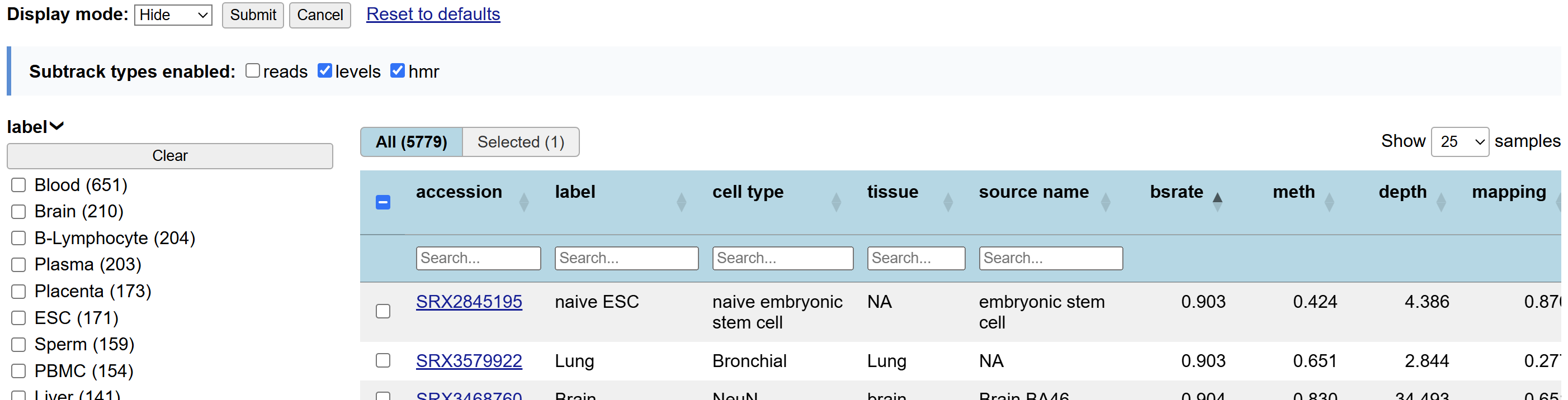
In most situations, the interface is a table with one row per subtrack, and users pick whichever rows they want. Clicking a row adds that subtrack to the display, and clicking it again removes it. The facet filters alongside the table narrow the list down, which matters because these lists are usually too long to scroll through.
metaDataUrl
To set up the facets, the track needs to include a description of which facets
exist and what value each track has for them. That information lives in a
separate web-accessible TSV (tab-separated value) file, named in the track's
metaDataUrl setting. Here is an example with more metadata than the previous
one:
accession   tissue  protocol    treatment   _date   __count
SRR11111    blood   Omni-ATAC-seq   control 2026-01-01  12
SRR11112    blood   Omni-ATAC-seq   IFNg6h  2026-01-01  31
SRR11113    spleen  Omni-ATAC-seq   control 2026-08-21  8
SRR11114    spleen  Omni-ATAC-seq   IFNg6h  2026-08-22  17
Save those lines into a file called something like "myTrackMetadata.tsv", then attach it to your faceted composite by adding
metaDataUrl https://url/to/myTrackMetadata.tsvto the trackDb settings for the faceted composite track. Copying the block above usually turns the tabs into spaces, so download metadata.simple.tsv, which holds exactly those rows, and edit it in place.
Two of the field names in this example file need explaining: "date" begins with one underscore and "count" begins with two. Those prefixes control whether the field gets a facet and a search box:
| Field name in the TSV | Facet on the page | Search box in the table |
|---|---|---|
tissue |
yes | yes |
_date |
no | yes |
__count |
no | no |
The primaryKey field never gets a facet of its own.
primaryKey
The primaryKey setting is required and works together with the metaDataUrl
setting. metaDataUrl gives the location of the metadata file, and primaryKey
specifies which field in that file identifies the subtracks. That column does
not have to come first in the file, though it is often convenient to organize
the metadata that way. Its values have to be unique - no two rows sharing the
same value. The metaDataUrl setting above would be combined with a setting
reading
primaryKey accession
to indicate that subtrack names are pulled from values in the "accession" column,
and that subtracks would be named <parent_name>_SRR11111,
<parent_name>_SRR11112, <parent_name>_SRR11113, and so on. The corresponding
trackDb stanzas for the parent and child tracks would then look something like this:
  track SRRComposite
  compositeTrack faceted
  metaDataUrl https://url/to/myTrackMetadata.tsv
  primaryKey accession
  shortLabel Omni-ATAC-seq
  longLabel Omni-ATAC-seq Results

  track SRRComposite_SRR11111
  parent SRRComposite
  type bigBed
  bigDataUrl https://url/to/SRR11111_data.bb
  shortLabel SRR11111 peaks
  longLabel SRR11111 blood control peaks

  track SRRComposite_SRR11112
  parent SRRComposite
  type bigBed
  bigDataUrl https://url/to/SRR11112_data.bb
  shortLabel SRR11112 peaks
  longLabel SRR11112 blood IFNg6h peaks

  track SRRComposite_SRR11113
  parent SRRComposite
  type bigBed
  bigDataUrl https://url/to/SRR11113_data.bb
  shortLabel SRR11113 peaks
  longLabel SRR11113 spleen control peaks

  track SRRComposite_SRR11114
  parent SRRComposite
  type bigBed
  bigDataUrl https://url/to/SRR11114_data.bb
  shortLabel SRR11114 peaks
  longLabel SRR11114 spleen IFNg6h peaks
dataTypes
The examples above assume one track per accession. In some situations, though,
each accession has several tracks in a predictable pattern - a raw counts
bigWig, a scaled counts bigWig, and a peak calls bigBed, for instance. One way
to handle that is to create synthetic accessions like SRR11111_counts,
SRR11111_scaled, and SRR11111_peaks, and treat them all as completely
independent. This works, but it fails to capture the relationship between the
three tracks, and it puts three rows with identical metadata in the table. The
dataTypes setting is the alternative: it lists which data types (raw counts,
scaled counts, and peaks) are available for each sample accession. Use it once
on the parent track. It expects the same set of data types to be available for
every accession.
With dataTypes in use, the page gets an extra selector near the top for choosing which data types to display. Whatever is chosen there applies to every sample selected in the table, so this is a bit less flexible than the plain one-row-per-track arrangement. In exchange, one row per sample can save significant space both in the configuration UI and in the metadata TSV file.
An important note: dataTypes changes the rules for subtrack names. Without
it, subtrack names are expected to match
<parent track name>_<primary key value>, as in the quick start near the top of
the page. With it, they are expected to match
<parent track name>_<primary key value>_<data type>. If the composite above
used the data types "signal" and "peaks" instead of just peaks, the set of
tracks might look like this:
  track SRRComposite
  compositeTrack faceted
  metaDataUrl https://url/to/myTrackMetadata.tsv
  primaryKey accession
  shortLabel Omni-ATAC-seq
  longLabel Omni-ATAC-seq Results
  dataTypes signal peaks

  track SRRComposite_SRR11111_peaks
  parent SRRComposite
  type bigBed
  bigDataUrl https://url/to/SRR11111_data.bb
  shortLabel SRR11111 peaks
  longLabel SRR11111 blood control peaks

  track SRRComposite_SRR11111_signal
  parent SRRComposite
  type bigWig 0 100
  bigDataUrl https://url/to/SRR11111_data.bw
  shortLabel SRR11111 signal
  longLabel SRR11111 blood control signal

  track SRRComposite_SRR11112_peaks
  parent SRRComposite
  type bigBed
  bigDataUrl https://url/to/SRR11112_data.bb
  shortLabel SRR11112 peaks
  longLabel SRR11112 blood IFNg6h peaks

  track SRRComposite_SRR11112_signal
  parent SRRComposite
  type bigWig 0 100
  bigDataUrl https://url/to/SRR11112_data.bw
  shortLabel SRR11112 signal
  longLabel SRR11112 blood IFNg6h signal

  track SRRComposite_SRR11113_peaks
  parent SRRComposite
  type bigBed
  bigDataUrl https://url/to/SRR11113_data.bb
  shortLabel SRR11113 peaks
  longLabel SRR11113 spleen control peaks

  track SRRComposite_SRR11113_signal
  parent SRRComposite
  type bigWig 0 100
  bigDataUrl https://url/to/SRR11113_data.bw
  shortLabel SRR11113 signal
  longLabel SRR11113 spleen control signal

  track SRRComposite_SRR11114_peaks
  parent SRRComposite
  type bigBed
  bigDataUrl https://url/to/SRR11114_data.bb
  shortLabel SRR11114 peaks
  longLabel SRR11114 spleen IFNg6h peaks

  track SRRComposite_SRR11114_signal
  parent SRRComposite
  type bigWig 0 100
  bigDataUrl https://url/to/SRR11114_data.bw
  shortLabel SRR11114 signal
  longLabel SRR11114 spleen IFNg6h signal
metadata.tsv
accession   tissue  protocol    treatment   _date   __count
SRR11111    blood   Omni-ATAC-seq   control 2026-01-01  12
SRR11112    blood   Omni-ATAC-seq   IFNg6h  2026-01-01  31
SRR11113    spleen  Omni-ATAC-seq   control 2026-08-21  8
SRR11114    spleen  Omni-ATAC-seq   IFNg6h  2026-08-22  17
One other note: sometimes you want more descriptive text than just "peaks" or
"signal" in the selector, but the better label can't be used as part of a track
name (maybe because it includes spaces). Specify the data type as
<name>|"<label>" in that case. The "name" value generates the track names,
while the label is what gets displayed. If the signal and peaks tracks represent
methylated regions, then the following dataTypes setting might be appropriate:
dataTypes signal|"Methylation signal (scaled)" peaks|"Highly methylated regions"subtrackUrls
It can also be useful to have certain fields link out to external resources,
particularly when accessions are in use. The subtrackUrls setting describes
which fields become links and what the format of those URLs should be. Bringing
back this example metadata file:
accession   tissue  protocol    treatment   _date   __count
SRR11111    blood   Omni-ATAC-seq   control 2026-01-01  12
SRR11112    blood   Omni-ATAC-seq   IFNg6h  2026-01-01  31
SRR11113    spleen  Omni-ATAC-seq   control 2026-08-21  8
SRR11114    spleen  Omni-ATAC-seq   IFNg6h  2026-08-22  17
Suppose you want the accession column to link to SRA and the protocol column to link to a page describing the protocol. Add the following subtrackUrls setting to the composite's trackDb stanza:
subtrackUrls accession=https://www.ncbi.nlm.nih.gov/sra/$$ protocol=https://www.protocols.io/view/$$In each of these URLs, $$ is replaced with the relevant value from that field (one of the SRR strings for the accession field, or "Omni-ATAC-seq" for the protocol field).
The same <value>|"<label>" trick from the dataTypes section works here, for
cases where the URL needs one value and the column should display another. The
example above wouldn't quite work, because the actual URL for the protocol is
"https://www.protocols.io/view/omni-atac-seq-improved-atac-seq-protocol-14egn94jyl5d",
and nobody wants to read
"omni-atac-seq-improved-atac-seq-protocol-14egn94jyl5d" in a table cell. Setting
up the rows like this keeps the display readable and still links to the right
protocol:
accession   tissue  protocol    treatment   _date   __count
SRR11111    blood   omni-atac-seq-improved-atac-seq-protocol-14egn94jyl5d|"Omni-ATAC-seq"   control 2026-01-01  12
SRR11112    blood   omni-atac-seq-improved-atac-seq-protocol-14egn94jyl5d|"Omni-ATAC-seq"   IFNg6h  2026-01-01  31
SRR11113    spleen  omni-atac-seq-improved-atac-seq-protocol-14egn94jyl5d|"Omni-ATAC-seq"   control 2026-08-21  8
SRR11114    spleen  omni-atac-seq-improved-atac-seq-protocol-14egn94jyl5d|"Omni-ATAC-seq"   IFNg6h  2026-08-22  17
Troubleshooting
Most problems when building a faceted composite trace back to a mismatch between the metadata TSV file and the subtrack names in the trackDb stanza. Check carefully that the values in the primaryKey column match the names of the subtracks, including capitalization. The hubCheck tool does not automate these checks yet, but that work is in progress.
Other important considerations:
- Check the capitalization of the trackDb settings themselves (metaDataUrl, primaryKey, dataTypes, subtrackUrls, compositeTrack faceted).
- The metadata file has to be tab-separated. Copy-pasting text often converts those tabs into spaces. Downloading metadata.simple.tsv keeps the tabs intact.